How do I make a one-time payment?
You can make a payment in two ways: through a payment link we sent you by text or email, or by signing in to your portal and choosing Make a payment.
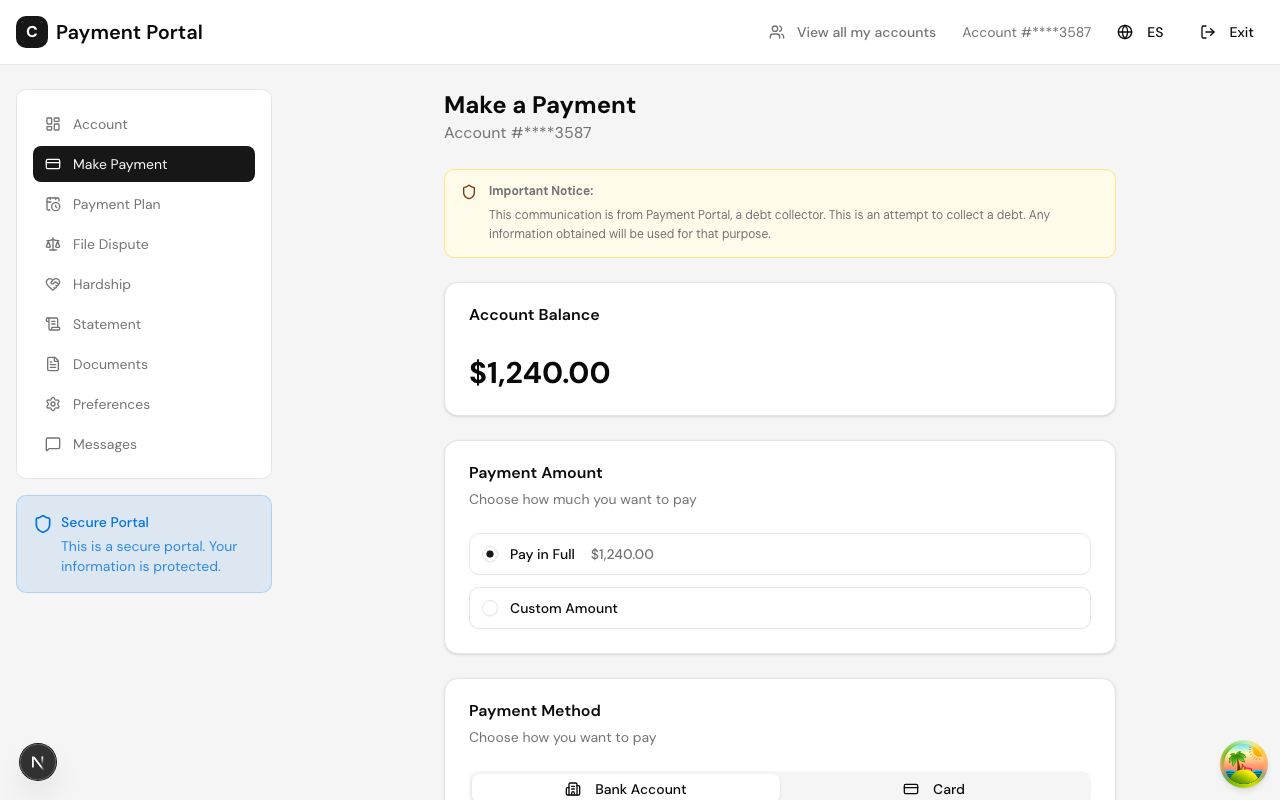
Steps
1. Open your portal and go to the Pay page. Your current balance is shown at the top, with your account number partially masked for privacy.
2. Choose how much to pay — your full balance or another amount you enter yourself.
3. Choose how to pay:
- Bank transfer (ACH) — pay directly from your checking or savings account.
- Card — pay with a debit or credit card, where available.
4. Enter your payment details (or pick a payment method you saved earlier) and confirm.
When the payment goes through, you will see a confirmation screen and a receipt is added to your account. You can view or download it any time from Receipts or Documents.
Good to know
- The pay page only shows the options that apply to your account and your state, so what you see may differ slightly from this article.
- Bank transfer is often the recommended option when both are offered.
- If you see a message that your payment is processing, do not submit it again — the payment was received and will settle shortly. Submitting again could result in paying twice.
- You can save a payment method securely for next time. Payment details are handled by our payment processor; ClaraPay does not store your full card or bank numbers.
Still stuck?
If a payment will not go through, or you are not sure whether it went through, send us a note from the Messages page — we can check for you before you try again.
Last updated August 20, 2026
Was this article helpful?