Client portal overview & first sign-in
The ClaraPay client portal is how you see your portfolio in real time: place accounts, track what we are collecting, review remittances, and handle reporting and compliance questions — all in one place.
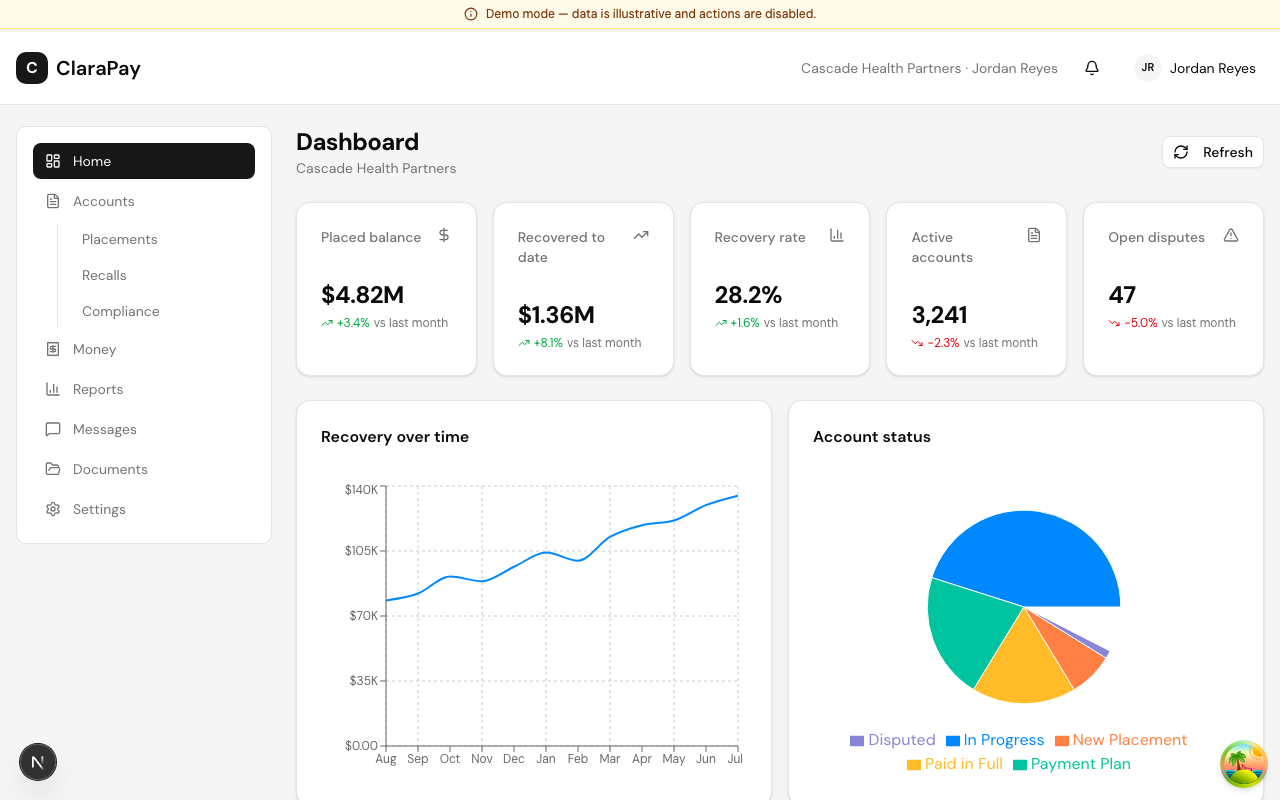
Signing in
Your portal lives at /client. Sign in at /client/login with the email address your account was provisioned with and your password. If you forget your password, use the reset link on the sign-in page — a one-time link is emailed to the address on file and expires after a short window.
If your organization is still being set up, sign-in takes you to the onboarding checklist instead of the dashboard. See Onboarding checklist & go-live for what to expect.
The dashboard
After sign-in you land on your dashboard. It is built to answer the common questions in the first ten seconds:
- KPI tiles — accounts in market, balance under collection, collected month-to-date, collection rate, and active disputes, each with a change indicator versus the prior month.
- Charts — collections by month, current status distribution, and portfolio aging.
- Recent payments — the latest payments posted to your portfolio.
Finding your way around
The left navigation covers the main areas:
| Area | What it is for |
|---|---|
| Accounts | Placements, individual accounts, recalls, compliance |
| Money | Remittances and statements |
| Reports | Canned reports and the custom report builder |
| Documents | Agreements and files ClaraPay shares with you |
| Messages | Your secure thread with the ClaraPay team |
| Settings | Business profile and team access |
Still stuck? Message us from /client/messages — your account team responds inside the thread.
Last updated August 20, 2026